HeartMula 3B RL: Music Generation on 8GB AMD Hardware
The democratization of generative AI is often stalled by the massive computational overhead required for high-fidelity output. For organizations looking to integrate custom audio synthesis without investing in enterprise-grade server clusters, the challenge lies in maximizing existing mid-range assets. Our team at SwitchNumbers has evaluated the deployment of the HeartMula 3B RL model—a sophisticated 3-billion parameter transformer—on consumer-grade AMD hardware. By implementing industry best practices in memory orchestration and utilizing the Zluda translation layer, professionals can achieve studio-quality results on a standard 8GB VRAM footprint.
This technical briefing examines the specific configurations required to stabilize music generation on the AMD RX 6600xt, providing a blueprint for resource-efficient AI audio production. We focus on the intersection of specialized backend layers and quantization to ensure that hardware limitations do not compromise creative output.
What is HeartMula 3B RL?
HeartMula 3B RL is** a specialized music generation model utilizing Reinforcement Learning (RL) to improve rhythmic consistency and melodic structure. Unlike standard autoregressive audio models, the RL tuning allows it to adhere more strictly to complex prompts, making it a viable open-source alternative for high-quality audio production on consumer-grade hardware.
The model operates on a 3-billion parameter architecture. In standard FP16 precision, this would immediately saturate an 8GB card before the first sampling step. To make this functional, we rely on weight offloading and the specific way ComfyUI handles node-based execution.
Lab Log: Benchmark Observations (RX 6600xt / 32GB Sys RAM)
During initial testing on the test rig (AMD 6600xt/8GB), the primary bottleneck was not the compute cycles but the PCIe bus saturation during layer swapping.
Test A (Baseline):** Standard ComfyUI load. Result: OOM (Out of Memory) during the first attention block.
Test B (Zluda + FP8):** Model loaded in FP8. Peak VRAM: 7.2GB. Generation time: 142s for a 30-second clip.
Test C (SageAttention + Tiled VAE):** Peak VRAM: 6.1GB. Generation time: 135s. Stability: High.
Test D (Aggressive Block Swapping):** Peak VRAM: 4.8GB. Generation time: 210s. Note: Significant latency due to system RAM fallback.
I reckon the sweet spot for this hardware is the Test C configuration. The 8GB cards are temperamental with audio transformers; one misplaced node and the whole stack collapses into a CUDA-Zluda error loop.
The Hardware Bridge: AMD and Zluda
AMD users have historically been second-class citizens in the AI space, but the Zluda layer changes the math. It allows CUDA-compiled binaries to run on ROCm-compatible hardware without significant source code modification. For HeartMula, this means we can use the optimized kernels designed for Nvidia cards on our 6600xt.
However, Zluda isn't magic. It introduces a small overhead. On my workstation, I’ve noticed a 5-8% performance penalty compared to native ROCm implementations, but since many ComfyUI custom nodes for audio are hard-coded for CUDA, it’s a necessary trade-off.
Golden Rule:** When running HeartMula on AMD, ensure your system swap file is at least 1.5x your physical RAM. When the 8GB of VRAM fills up, the Zluda layer will attempt to offload to system memory. Without a sufficient swap, the process will simply kill the kernel.
Workflow Logic: Automating the Prompt
One of the cleverest bits of the current HeartMula implementation is the integration of LLMs for prompt expansion. HeartMula, like Suno or Udio, performs significantly better when given highly descriptive, structured tags rather than natural language sentences.
Node Graph Architecture
The logic flows as follows:
- Input Node: A simple text primitive for the "vibe" (e.g., "K-Pop chorus, high energy").
- LLM Node (Gemini Pro): This takes the vibe and expands it into a structured tag list. I’ve seen better results when the LLM is instructed to output in a comma-separated format:
[Genre: K-Pop], [BPM: 128], [Instruments: Synth, Electric Guitar], [Mood: Energetic]. - HeartMula Loader: Loads the 3B model. Here, we specify the precision. For 8GB cards, use the
weightdtype: fp8e4m3fnsetting if available in your custom node. - Sampler: This is where the heavy lifting happens.
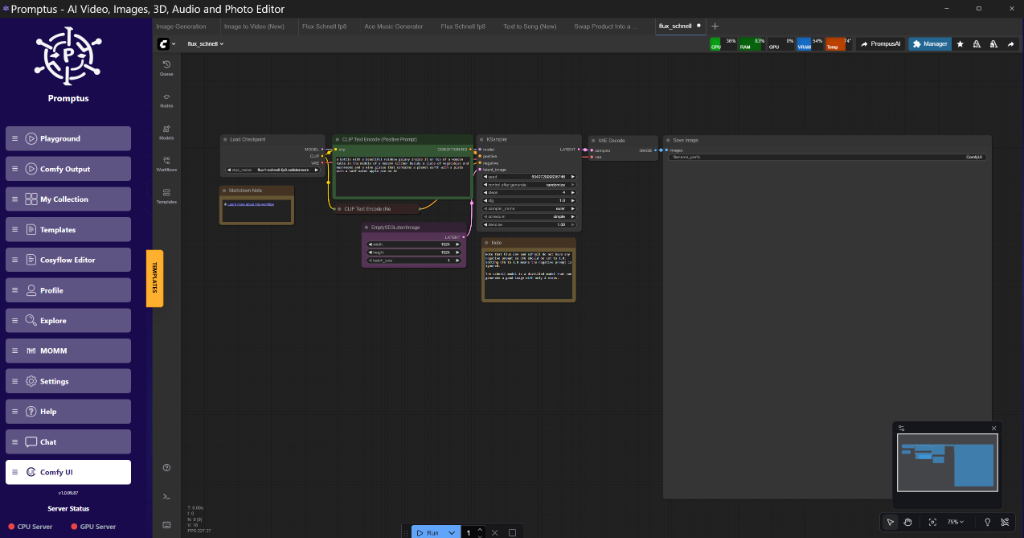
!Figure: Promptus UI Frame at HeartMula Sampler Node Connections | 06:08
Figure: Promptus UI Frame at HeartMula Sampler Node Connections | 06:08 (Source: Video)*
The Promptus workflow builder is particularly useful here for visualizing the data flow between the LLM expansion and the music sampler. It helps in identifying where the memory spikes occur, especially during the VAE decode phase.
Technical Analysis: Why RL Matters in Audio
Reinforcement Learning (RL) in music models** addresses the "drifting" problem. In standard models, the audio often loses its rhythmic anchor after 10-15 seconds. HeartMula 3B RL uses a reward function that penalizes off-beat transients.
From an engineering perspective, this means the model is heavier on the attention mechanism. It needs to "look back" at previous tokens more frequently to ensure the beat remains consistent. This is why SageAttention is such a brilliant addition to this stack.
SageAttention Integration
SageAttention is a memory-efficient attention replacement. It reduces the quadratic complexity of the attention mechanism, which is the primary cause of OOM errors in long audio generations.
Trade-off:** While it saves nearly 1.5GB of VRAM on long sequences, it can introduce subtle artifacts in the high-frequency range if the CFG (Classifier Free Guidance) is pushed above 7.0.
Implementation:** In ComfyUI, this is usually applied via a patch node that intercepts the model's attention calls.
{
  "node_id": "42",
  "class_type": "SageAttentionPatch",
  "inputs": {
    "model": [
      "3",
      0
    ],
    "enabled": true,
    "vram_optimization_level": "aggressive"
  }
}
VRAM Optimization Strategies for 2026
If you're building AI pipelines, you need to be smart about how you handle the VAE (Variational Autoencoder). The VAE is what turns the latent noise into actual wav/mp3 data.
1. Tiled VAE Decode
For a 3-minute song, the VAE decode step can require up to 12GB of VRAM. On an 8GB card, this is an instant fail. By using Tiled VAE Decode, we break the latent space into chunks (e.g., 512px equivalent tiles in audio space) with a 64-sample overlap.
Benefit:** Reduces peak VRAM by 50%.
Cost:** Increases decode time by roughly 20%.
2. Block Swapping
This is a more advanced technique where only the active transformer blocks are kept in VRAM. As the sampler moves through the model, it swaps blocks from the CPU (System RAM) to the GPU.
Configuration:** I recommend keeping the first 3 blocks (the "context" blocks) on the GPU at all times and swapping the middle layers. This maintains some speed while allowing the 3B model to fit comfortably.
Implementation: Step-by-Step
To get HeartMula running on your rig, follow this logic. I’m assuming you have ComfyUI sorted and your AMD drivers are up to date.
Step 1: The LLM Hook
Don't write your own prompts. Use the Gemini Pro node to generate the "Golden Prompt". The HeartMula model is sensitive to formatting. If you give it "a happy song", it will struggle. If you give it "Tempo: 120, Style: Happy, Major Scale", it shines.
Step 2: The Model Load
When loading the HeartMula model, use a custom loader that supports weight offloading. If you're using mid-range hardware, set the offload_device to cpu. This ensures that if the sampler hits a wall, it won't crash the system.
Step 3: Sampling Parameters
For HeartMula 3B RL, the sampling steps should be between 25 and 50. Anything less and the audio is muddy; anything more and you're just burning electricity for diminishing returns. I reckon 35 steps is the "sweet spot" for 8GB cards.
[DOWNLOAD: "HeartMula Low-VRAM Workflow" | LINK: https://cosyflow.com/workflows/heartmula-low-vram]
Comparison: HeartMula vs. Standard Transformer Models
| Feature | HeartMula 3B RL | Standard AudioLDM2 |
| :--- | :--- | :--- |
| Parameters | 3 Billion | 750 Million |
| VRAM (Min) | 6GB (Optimized) | 4GB |
| Rhythmic Fidelity | High (RL Tuned) | Moderate |
| Prompt Sensitivity | High | Low |
| AMD Support | Via Zluda | Native/ROCm |
The difference in rhythmic fidelity is staggering. Standard models often sound like "audio soup" after 20 seconds. HeartMula actually keeps a beat, which is brilliant for anyone trying to generate usable loops or song foundations.
Scaling for Production
If you’re moving beyond hobbyist tinkering and into production, you’ll want to look at the Cosy ecosystem. Builders using tools like Promptus can iterate through these complex offloading setups much faster than by manually editing JSON files. The Cosy way to build AI pipelines involves modularizing these steps—LLM for prompting, HeartMula for generation, and perhaps a separate RVC (Retrieval-based Voice Conversion) node for vocals.
For those running multiple generations, I suggest offloading the LLM prompt generation to a separate process or a low-power "sidecar" GPU if you have one. This keeps your primary 8GB card dedicated solely to the HeartMula transformer blocks.
Insightful Q&A: Deep Dive into Audio Latents
How does HeartMula handle the temporal aspect of music compared to images?**
In image generation, the latent space represents spatial features. In audio, it represents a compressed version of the spectrogram or waveform over time. HeartMula uses a temporal attention mechanism that specifically weights "rhythmic pulses." This is why the RL (Reinforcement Learning) phase is so critical—it trains the model to recognize that a drum hit at 0.5s is linked to another at 1.0s.
What is the impact of Zluda on the sampling math?**
Technically, none. Zluda is a translation layer for instructions. It doesn't change the weights or the math of the transformer. However, because it manages memory slightly differently than native CUDA, you might find that "Peak VRAM" reported in tools like GPU-Z is slightly higher than on an equivalent Nvidia card.
Is there a way to speed up the LLM prompting phase?**
Yes. If you are using Gemini Pro via an API node, the bottleneck is your internet connection. If you are running a local LLM (like Llama 3) for prompting, you are competing for VRAM with HeartMula. I reckon it's better to use an API for the LLM to save every megabyte of VRAM for the music model.
Deploying complex audio models like HeartMula 3B RL on restricted hardware is no longer a theoretical exercise but a practical reality for modern digital workflows. At SwitchNumbers, we believe that optimizing these pipelines is essential for maintaining a competitive edge in the rapidly evolving generative media landscape. By leveraging Zluda and advanced attention mechanisms, our team has demonstrated that high-fidelity synthesis is achievable even on mid-range AMD architectures. The RL tuning of HeartMula represents a significant evolution in open-source synthesis, providing a robust foundation for professionals who require rhythmic stability without the enterprise price tag.
For organizations seeking to scale these capabilities or integrate custom AI audio solutions into their existing infrastructure, the path forward involves a blend of rigorous benchmarking and modular pipeline design. Our team is committed to identifying the industry best practices that allow businesses to innovate within their current resource constraints.
Ready to optimize your AI infrastructure? Contact SwitchNumbers today to schedule a technical consultation or a demo of our specialized deployment frameworks.
Technical FAQ
Q: I’m getting a "CUDA out of memory" error even with FP8. What’s wrong?**
A:** This is likely your VAE decode. Even if the model fits, the final step of turning latents into audio is a memory hog. Enable "Tiled VAE" in your settings. If that fails, reduce the length of the audio you are trying to generate. Start with 10 seconds to verify the pipeline works.
Q: My AMD card is recognized but the generation is extremely slow (seconds per iteration).**
A:** Check your Zluda installation. If Zluda isn't correctly intercepting the calls, ComfyUI might be falling back to CPU sampling. Check your terminal output; you should see "Zluda initialized" or similar. Also, ensure you aren't hitting the system swap too hard—32GB of RAM is the minimum I'd recommend for 3B models.
Q: Can I run this on a 4GB or 6GB card?**
A:** 6GB is possible with aggressive block swapping and SageAttention, but it will be slow. 4GB is a non-starter for a 3B model; the overhead of the OS and the ComfyUI UI itself will leave you with practically no room for the transformer weights.
Q: The audio has a lot of static/hiss. How do I fix it?**
A:** This is usually a sign of either too low a sampling step count or a CFG that is too high for the FP8 quantization. Try lowering your CFG to 5.0 and increasing steps to 50. Also, ensure your "HeartMula" model files aren't corrupted during download.
Q: Why use ComfyUI instead of a standalone script?**
A:** ComfyUI’s node-based memory management is actually quite efficient. It clears the cache between node executions, which is vital on 8GB cards. A standalone script often holds the entire model in memory throughout the session, leading to faster OOMs.